The problem
With the rapid expansion of high-speed access, Fiber-to-the-Home is becoming the standard for providing connectivity to urban residences. While FttH provides great benefits when it comes to speed and reliability, it is usually accompanied by a renunciation of our right to handle our own infrastructure.
Most ISPs that install FttH provide All-in-One devices as the CPE, which does both the Fiber-to-Ethernet modulation and the typical router / switch / access point tasks we nowadays expect from our routers. This device usually has a very locked down set of features. Hardly ever you will see any VLAN or firewall configuration available to the end-user, for example.
This is a very comfortable setup for the non-technically inclined, but it becomes excessively burdensome for any task that requires a minimum of customization.
My case is not out of the ordinary in this regard. Around 2019, our fiber connection was serviced by MasMovil, which kindly also supplied us with a Sagemcom F@ST 5655v2, an AIO router with moderate specs, enough to service our 300MbE connection.
At the time, I started reading up on IPv6. I found it terribly interesting and was wondering why its adoption was so lacking, especially in Spain, which averaged around 3% at the time, trailing all big european countries except Ukraine.
I evidently also read about Hurricane Electric, an internet service provider that specializes in IPv6 connectivity. They are one of the biggest providers of IPv6 transit, being considered a tier 1 network in this protocol. They are also an IPv6 tunnel broker: they provide individuals that lack native IPv6 with IPv6 tunnels to be able to access the IPv6 internet.
Here is the catch: To be able to use these tunnels, you require a router that can be configured for such a task, which is to run a 6in4 tunnel. The router that MasMovil provided obviously did not allow for such a feature. Therefore, there was only one thing I could do: Figure out a way to replace it with my own.
This task would not prove easy. I quickly learned that the protocol that most ISPs use for last-mile connectivity is GPON, and these GPON connections require a password in order to decode the traffic and connect to them.
Alas, I did not have such password. Reading online I found that you can ask for such password when the technician first installs the equipment, but I did not know that at the time, so I did not think to ask then.
The only place that I could potentially obtain this password from is the router itself. I would need to access the router and extract this secret from inside.
First steps: search online
The obvious first reaction was to search online. There I found a few blog posts describing a way to open ssh access into several models of Sagemcom routers, such as the F@ST 5355 or 5364. I attempted to reproduce these attacks without luck. Searching a bit more it turned out that such attack was patched in the newest firmware version, which I had.
With such bad prospects, I chose to buy the same model off second-hand to replicate the attack and obtain more info on the internals of this machine to be able to craft a new attack.
Having booted this second-hand router, I successfully managed to apply the hack to gain ssh access. Unfortunately, there was no way of replicating this on the newer version.
Second strategy: UART
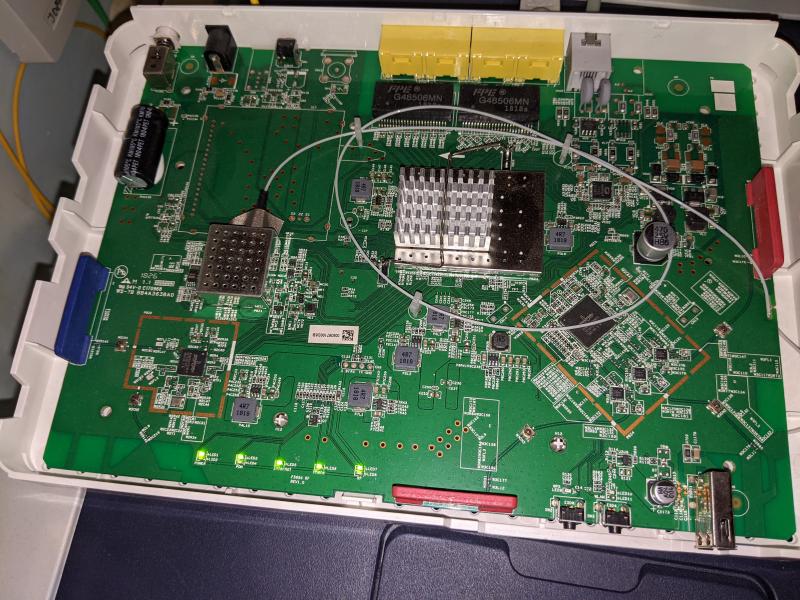
Just for fun I chose to pry open the plastic casing that protected the router PCB. I couldn’t make much sense of that was going on in there, but after looking around for a bit, I did see something familiar.
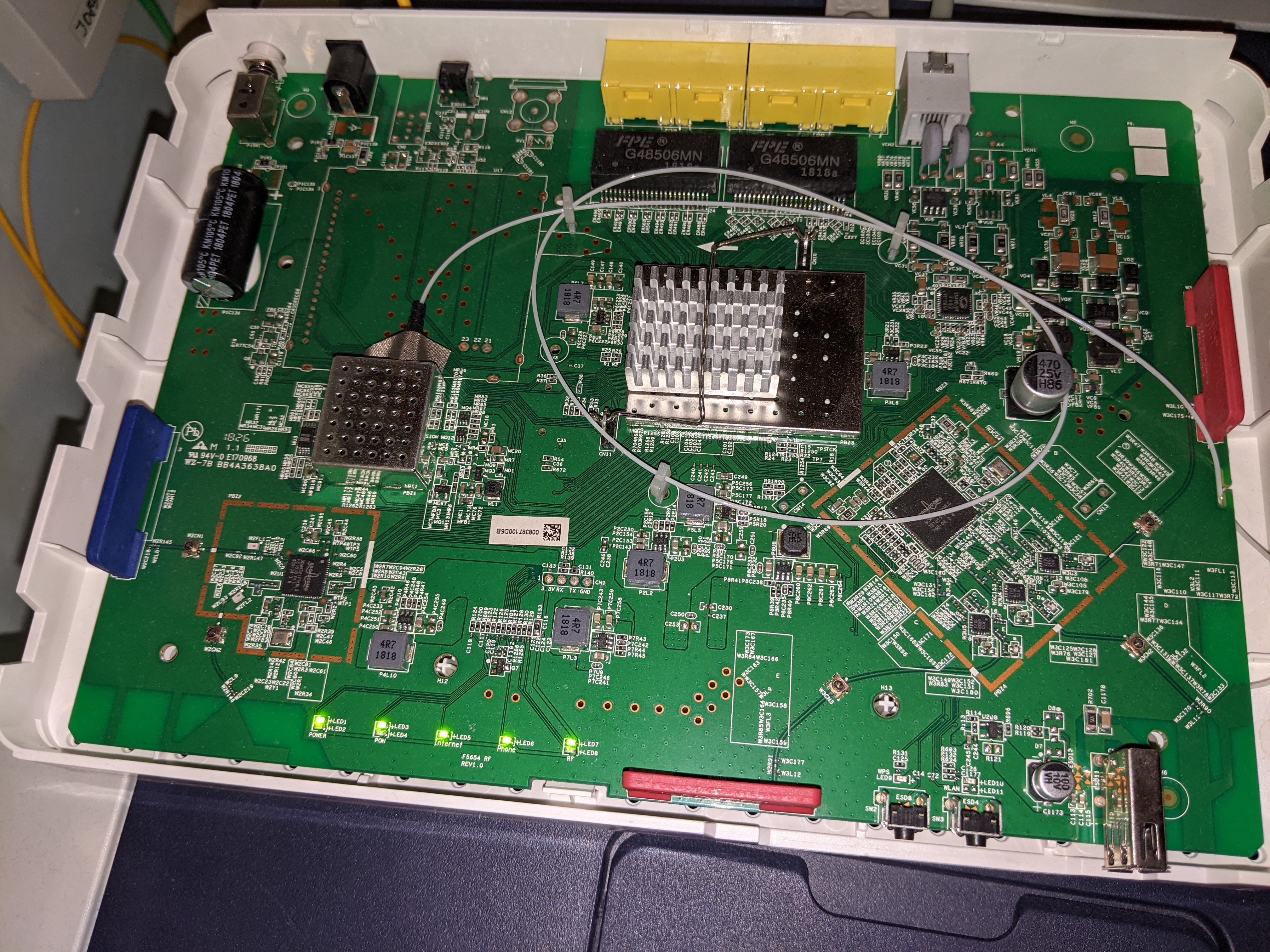
I managed to spot a set of 4 pads lined up and very clearly labeled. It had to be a UART connector. I already had little hope for this attack, but I had to try it anyway. I bought a cheap USB to UART converter and connected it to the board.
After rebooting the device, I was presented with the following log:
UART Log (Abridged) (Click to expand)
CFE version 1.0.38-116.174 for BCM96838 (32bit,SP,BE)
Build Date: Fri Jan 20 18:54:28 CET 2017 (g601671@rmm-1186759)
Copyright (C) 2000-2013 Broadcom Corporation.
Version cfe-ram: 7.31.17.1

U-Boot 2011.12
Version: 7.31.17.1-full (Jan 20 2017 - 18:53:37)
Copyright (C) 2011 - 2013 Sagemcom All rights reserved
Board: Sagemcom fast
CPU: Broadcom BCM68380 (Chip1 Rev4)
DRAM:  256 MiB
NAND:  128 MiB
Using default environment

## Booting kernel from Legacy Image at 8c3df000 ...
   Image Name:   scOS SG3V10000295 (masmovil_v0.3
   Created:      2020-05-26   5:24:05 UTC
   Image Type:   MIPS Linux Kernel Image (gzip compressed)
   Data Size:    2424832 Bytes = 2.3 MiB
   Load Address: 80010000
   Entry Point:  803ba690
   Verifying Checksum ... OK
   Uncompressing Kernel Image ... OK

Starting kernel ...

Linux version 3.4.11-rt19 (g533718@rmm08492) (gcc version 4.6.2 (GCC) ) #1 SMP PREEMPT Tue May 26 07:23:57 CEST 2020
This log does not do much for the task at hand, but it does provide some interesting information.
We gather that it is running on U-Boot 2011.12, a GPL 2.0 licensed micro-bootloader. U-Boot by default would allow you to press Ctrl+C to abort the boot and drop you into a command prompt with useful commands, such as md (memory display) which allows for reading the contents of specific memory locations. I tried interacting with the terminal, but the only thing I got it to print was Got Ctrl when I pressed Ctrl+C, with no other reaction.
It seems Sagemcom might have modified their version of U-Boot to disable the command prompt, thus locking down any possibility of interacting through the UART. According to the GPL, they should provide the source to anyone that asks. After contacting them on three different email addresses, they refused to provide the GPL-licensed code, which means they’re in clear violation of the license. I afterwards found on the internet a squashfs image which included the supposed bootloader binary for a router in the same family. Just for fun, I did some decompiling with Ghidra, and what I found would not surprise you.
The following is the original u-boot source code:
// arch/mips/lib/board.c
void board_init_r(gd_t *id, ulong dest_addr)
{
   /* ... */
	puts("Net:   ");
	eth_initialize(gd->bd);

	/* main_loop() can return to retry autoboot, if so just run it again. */
	for (;;)
		main_loop();

	/* NOTREACHED - no way out of command loop except booting */
}
And the following I managed to decompile from the binary:
void board_init_r(gd_t *id, ulong dest_addr)
{
  /* ... */
  puts("Net:   ");
  eth_initialize(gd->bd);

  if (gd->unknown_3 != 0) {
    sagem::sb3_sagem_init();
                    /* WARNING: Subroutine does not return */
    hang();
  }

  do {
    main_loop();
  } while( true );
}
They modified the source very explicitly to avoid reaching the main_loop function, which handles the Ctrl+C command to drop into boot prompt.
It seemed like this avenue was dead.
Breakthrough: Impersonate the ACS server
I searched a bit more online and found a new article that managed to escape me at first. It is not specific to my router model, but at first glance it looked like it might do the trick.
The essence of this blog post’s attack is to impersonate the ACS (Application Configuration Service) server, which is responsible for configuring every aspect of the router remotely by the ISP. We impersonate it by acting as a proxy between the router and the real ACS server, thus being able to listen to their conversation. It looked promising at first, but I ran into a small roadblock. Whereas the post author’s model allows for this ACS server to be within the LAN, mine only allowed this connection through the fiber port.
I then had the idea of trying to use the second-hand router I got to impersonate the real router. Since the second-hand router was already cracked, I managed to change the interface in which the ACS connection would be established to an ethernet connection. In this way, I could set up a laptop to do the proxying between the second-hand router and the ACS server.
From this ordeal I got a rough understanding of what exactly was being communicated in this conversation: A huge amount of SOAP requests and responses. Some of them more than a Megabyte long. Most of their content was useless, but I got a rough understanding of how these communications were happening, which messages were sent in response to which requests, or what was the general content of these request and response bodies.
I felt ready to attempt the same on the real router. I spun up an EC2 instance with the same proxy script that I was using earlier, and set its ip address as the ACS url in the router. Before restarting the router, I did a simple smoke test to make sure it was working. I tried to send a request myself pretending to be the router, and the result discouraged me significantly. My EC2 instance could not connect to the ACS server. It seems they might be refusing any connections coming from outside their network.
Not falling for despair, I decided to act as the server myself. For every request that the router would send, I quickly crafted a fake response based on the communications I gathered earlier. In particular, I crafted the following response:
<soap:Envelope xmlns:cwmp="urn:dslforum-org:cwmp-1-0" xmlns:soap="http://schemas.xmlsoap.org/soap/envelope/" xmlns:soap-enc="http://schemas.xmlsoap.org/soap/encoding/" xmlns:xsd="http://www.w3.org/2001/XMLSchema" xmlns:xsi="http://www.w3.org/2001/XMLSchema-instance">
   <soap:Header>
      <cwmp:ID soap:mustUnderstand="1">27b552c7</cwmp:ID>
   </soap:Header>
   <soap:Body>
      <cwmp:SetParameterValues>
         <ParameterList soap-enc:arrayType="cwmp:ParameterValueStruct[2]">
            <ParameterValueStruct>
               <Name>Device.Services.X_MM_RemoteAccess.SSHEnable</Name>
               <Value xsi:type="xsd:boolean">true</Value>
            </ParameterValueStruct>
            <ParameterValueStruct>
               <Name>Device.Services.X_MM_RemoteAccess.TELNETEnable</Name>
               <Value xsi:type="xsd:boolean">true</Value>
            </ParameterValueStruct>
         </ParameterList>
         <ParameterKey>n/a</ParameterKey>
      </cwmp:SetParameterValues>
   </soap:Body>
</soap:Envelope>
And it worked! This finally allowed me to force the server to open the ssh ports it has been guarding so strongly. The username and password were the same as the ones used for the web interface, which I already had. I was in! It was only one more step to obtain the GPON password:
$ cat /opt/filesystem1/data/optical_conf.txt
3455xxxxxxxxxxxxxxxx
Just for fun: Decompiling the firmware
We already captured the flag that we were looking for, but there was still a thing that bothered me. In order to let the user keep backups of the config, the web UI exposes a config backup page. Clicking the backup button downloads a file called device.cfg. From the start it was obvious they would not let anyone meddle with the router configuration that easily, so I was already expecting some hardships when opening this file. The reality was even worse. The file started with the magic byes AEAD. These aren’t really any standard format that I could find, but considering AEAD stands for Authenticated Encryption with Associated Data, this pointed in only one direction: The file was encrypted. I therefore took it as a challenge to decrypt it. Since I was already in full control of the router, I could easily download all the binaries that it was using to decompile them and try to reverse the encryption.
Searching for the magic bytes within the libraries led me straight to the source: libgsdf.so.1. Doing some decompiling of the library with Ghidra (which was made easier thanks to the debug symbols they graciously left in the binary) I found the function in which this string was being referenced. The function was called gsdfAeadEncrypt, and what lay inside was straight up the encryption key:
KEY[0] = '}';
KEY[1] = 0xa2;
KEY[2] = 'X';
KEY[3] = '\x13';
KEY[4] = 0xdd;
KEY[5] = 0x9d;
KEY[6] = 'z';
KEY[7] = '\x15';
KEY[8] = '>';
KEY[9] = '`';
KEY[10] = 0xa0;
KEY[11] = '(';
KEY[12] = 0xba;
KEY[13] = 0xdd;
KEY[14] = 0xb2;
KEY[15] = 0x88;
Which, converted to a more readable format, is 0x7da25813dd9d7a153e60a028baddb288. @Sagemcom: You can make me remove this from here if you give me the modified u-boot source code. Deal?
Addendum
After having done all of this back in 2020, someone else decided to independently discover how to extract the encryption key and posted their results on their blog, which cites other blog posts as their sources. Due to my procrastination, I only found out about this while writing this post 5 years after the fact. I still decided to publish this post because, hey, why not. I also did something that they did: Cross compile a small tool to run the decryption library in a more convenient way. Go read about it in their blog post! Although, in contrast as to how they did it, I actually did a cross-compilation from an x86 machine to the MIPS architecture of the router, which involved downloading and installing a cross-compilation toolchain.